Mutiara Instagram Canva Template: A Practical Guide for Stunning Social Media
In the fast-paced world of social media, your visual identity is often the first thing a potential customer notices. If you are a small business owner, a creative professional, or a lifestyle blogger, maintaining a consistent and high-quality feed can be a significant challenge. This is where the Mutiara Instagram Canva Template becomes an essential tool in your marketing arsenal. Designed specifically to elevate the presence of fashion brands, beauty services, artisans, and content creators, this pack offers a seamless transition from design chaos to professional polish.
However, simply purchasing a template does not guarantee success. Many users overlook critical details regarding file formats, customization capabilities, and the distinction between different design platforms. To ensure you get the most out of your investment, it is vital to understand exactly what the Mutiara Instagram Canva Template provides and how to avoid common pitfalls that can hinder your results.
Understanding the Dual-Platform Advantage
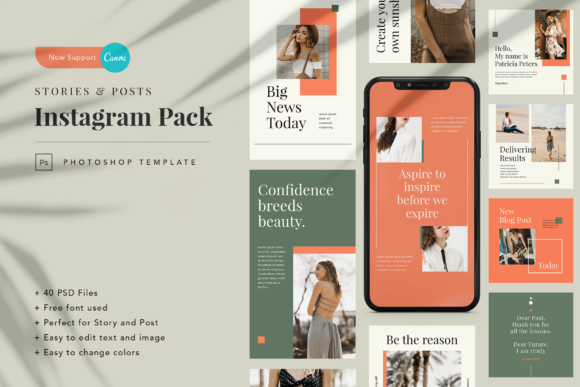
One of the most significant updates for this product line is the support for both Adobe Photoshop and Canva. Historically, many designers were forced to choose between the advanced layering capabilities of Photoshop or the user-friendly accessibility of Canva. The Mutiara pack resolves this dilemma by offering 40 unique templates in total: 20 vertical stories and 20 square posts, available in both PSD and Canva formats.
Why does this matter? If you are comfortable with Adobe Photoshop, you have full control over layers, blending modes, and complex effects using the PSD files. Conversely, if you prefer speed and ease of use, the Canva version allows you to edit designs directly in the browser without needing expensive software licenses. This flexibility ensures that whether you are a seasoned graphic designer or a beginner entrepreneur, the workflow remains efficient.
A common mistake is assuming that "Canva support" means the design is limited to basic drag-and-drop functionality. In reality, these templates are built with smart elements that allow for deep customization while retaining the intended aesthetic. When evaluating options, check that the Canva link provided is actually editable and not just a static image preview.
Common Mistakes When Using Design Templates
Even with a high-quality asset like the Mutiara pack, users often make errors that diminish the final output. Being aware of these potential issues can save you time and frustration.
- Ignoring Resolution Requirements: Instagram has specific dimension requirements. While the Mutiara templates come pre-scaled at 1080 x 1920 px for stories and 1080 x 1080 px for posts, uploading a low-resolution export can result in pixelated images that look unprofessional. Always ensure you are exporting in RGB color format as specified, rather than CMYK, which is intended for print.
- Neglecting Font Licensing: The template utilizes free fonts from Google Fonts. However, some users mistakenly try to replace them with premium fonts they do not own licenses for. Stick to the recommended font list included in the documentation to maintain the integrity of the design and avoid legal complications.
- Overlooking the Documentation: It is easy to dive straight into editing, but skipping the detailed PDF instructions or video guides is a missed opportunity. These resources often contain shortcuts for moving text boxes, replacing images, and adjusting colors that significantly speed up your workflow.
Evaluating Your Needs Before You Download
Before integrating the Mutiara Instagram Canva Template into your brand strategy, take a moment to assess your current setup. Are you looking for a quick solution for daily stories, or do you need a cohesive theme for a month-long campaign? The 40-file limit is substantial, but it requires organization. Without a clear plan, you might find yourself creating inconsistent content that confuses your audience.
Another crucial consideration is the source of your imagery. The product listing clearly states that all images used in the preview are for demonstration purposes only and are not included in the main files. Beginners sometimes assume they receive stock photos along with the template. If you do not have your own high-quality photography or access to a reliable stock library, the template will look incomplete. Invest time in gathering relevant assets before you begin customizing.
Maximizing Efficiency and Quality
To truly leverage the power of this template, focus on consistency. The strength of the Mutiara pack lies in its ability to create a unified brand voice across different formats. When switching between the story verticals and post squares, ensure your color palette and typography remain consistent. This builds trust with your followers, who should instantly recognize your content even without seeing your logo.
If you are using the Canva version, familiarize yourself with the "Brand Kit" feature. By saving your specific hex codes and fonts there, you can apply them to any element in the template with a single click. This approach prevents the common error of accidentally using slightly different shades of blue or green, which can dilute your brand identity.
For those using the PSD files, learn to organize your layers. Renaming layers logically (e.g., "Background," "Main Text," "Image Placeholder") makes future edits much easier. If you ever need to hand off the project to a colleague or freelancer, a well-documented file structure is invaluable.
Support and Continuous Improvement
No digital product is entirely self-explanatory, and having access to support is a key indicator of quality. The Mutiara team offers assistance via direct message or email, promising prompt replies. Do not hesitate to reach out if you encounter technical difficulties or need clarification on how to implement specific design changes. Engaging with support can also provide insights into best practices that you might not have considered.
Remember that a template is a starting point, not a finished product. The true value comes from how you adapt it to tell your unique story. Whether you are promoting a new makeup collection, sharing lifestyle tips, or showcasing artisan crafts, the Mutiara Instagram Canva Template provides the structural foundation you need to stand out.
By avoiding common mistakes, respecting the technical specifications, and utilizing the provided documentation, you can transform your Instagram promotion into something stunning and eye-catching. Take the time to explore the features, test the variations, and commit to a consistent visual strategy. With the right approach, this template can become an integral part of your growth journey, helping you connect more effectively with your audience.