Luxury Golden and Silver Text Effect Evaluation
In the realm of graphic design, typography often serves as the primary vehicle for conveying brand identity. When a project demands an atmosphere of opulence, prestige, or high-end exclusivity, standard typefaces frequently fall short. This is where specialized text effects become essential tools. The Luxury Golden and Silver Text Effect represents a specific category of digital assets designed to simulate metallic finishes on vector graphics. Unlike standard fonts that provide character shapes, this product offers a pre-configured visual treatment applied to existing text structures.
Understanding the distinction between a font file and a text effect is crucial for designers evaluating this asset. This resource is not a typeface that can be typed into any word processor or opened in non-vector software. Instead, it is a complex set of layer styles and editable paths contained within an Adobe Illustrator environment. For professionals seeking to elevate branding materials, packaging, or promotional art, determining whether this tool aligns with their workflow requires a clear assessment of its capabilities, limitations, and practical applications.
Defining the Asset: What Is It?
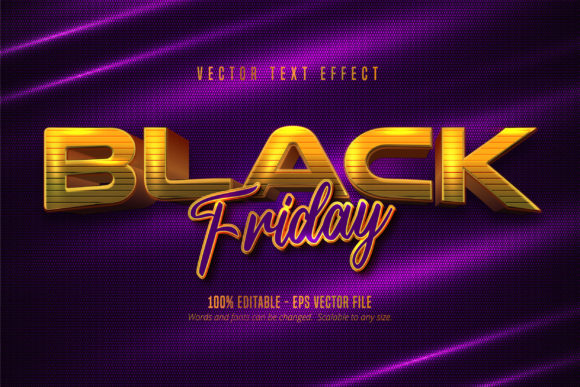
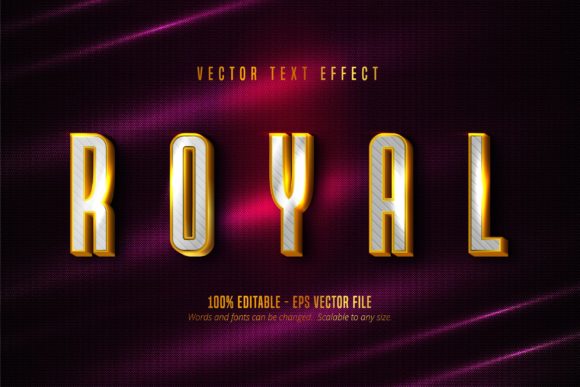
The Luxury Golden and Silver Text Effect is a collection of 100 distinct editable templates created specifically for Adobe Illustrator. These files are delivered in the EPS CS6 format, ensuring compatibility with older versions of the software while maintaining the integrity of vector data. The core function of this asset is to transform plain typography into realistic metallic surfaces. By manipulating light reflection, shadow depth, and texture, the effect creates the illusion of gold or silver plating on letters.
A critical technical detail for potential users is the file structure. Because these are vector-based effects rather than raster images or standard font files, they rely on the specific rendering engine of Adobe Illustrator. Attempting to open these files in alternative software such as Microsoft Word, Canva, or free vector editors like Inkscape will likely result in errors or a loss of the metallic properties. The design relies on gradients, inner shadows, and blend modes that are proprietary to the Adobe ecosystem. Therefore, the user must possess access to Adobe Illustrator CS6 or a compatible version to utilize the product effectively.
Reasons for Interest and Primary Benefits
Designers and business owners often seek out this specific effect to solve the problem of visual hierarchy and perceived value. Standard black or white text lacks the physical presence required for luxury branding. The benefits of using this editable text effect include:
- Instant Visual Impact: The immediate application of a metallic finish elevates the perceived quality of a logo or headline without requiring manual shading work.
- Full Editability: Despite the complex appearance, the text remains fully editable. Users can change the wording, adjust the font family, modify the kerning, and alter the letter spacing while retaining the golden or silver texture.
- Scalability: As a vector-based solution, the text can be scaled to any size, from a small business card to a large billboard, without losing resolution or introducing pixelation.
- Consistency: With 100 variations available, teams can maintain a consistent aesthetic across multiple campaigns while avoiding the monotony of a single style.
The ability to edit the underlying text is perhaps the most significant advantage over purchasing static PNG or JPEG textures. A designer can take a base template, replace the placeholder text with a client's name, and adjust the color temperature to match a specific brand palette. This flexibility makes the asset highly efficient for agencies managing multiple clients who require premium-looking deliverables.
Tradeoffs and Technical Considerations
While the visual results are compelling, there are notable tradeoffs and constraints that must be considered before acquisition. The primary limitation is software dependency. If a client or collaborator does not have Adobe Illustrator, sharing the final design becomes difficult. While the final output can be exported as PDF or SVG, the source file remains locked within the Adobe ecosystem. This can create friction in collaborative workflows involving freelancers or cross-departmental teams using different tools.
Another consideration is the learning curve associated with editing complex layer styles. Although the product is marketed as "very easy to edit," achieving a perfect result may require a fundamental understanding of how Illustrator handles gradients and blending modes. Users unfamiliar with these concepts might struggle to tweak the settings to suit specific background colors. For instance, a gold effect designed against a dark background may appear dull if placed on a light surface without adjusting the highlight intensity.
Furthermore, the file size can be substantial due to the complexity of the vector paths and the number of layers involved. Opening 100 files simultaneously or working with extremely detailed variations might impact performance on lower-specification hardware. Designers should ensure their system meets the requirements for handling heavy EPS files efficiently.
Situations Where This Effect Is a Strong Fit
This asset is particularly well-suited for industries where visual prestige is paramount. High-end fashion brands, jewelry retailers, and luxury real estate firms often require typography that communicates wealth and stability. In these contexts, the Luxury Golden and Silver Text Effect provides a cost-effective alternative to hiring a custom typographer or commissioning bespoke 3D renders.
It is also ideal for event branding, such as award ceremonies, galas, or exclusive product launches. The ability to quickly generate personalized invitations or stage backdrops with a consistent metallic theme allows organizers to maintain a high production value on tight deadlines. Additionally, for print-on-demand services, the scalability of the vector format ensures that the text looks crisp on everything from wedding stationery to large-format banners.
When Alternatives May Be Worth Considering
Despite its strengths, this tool is not universally applicable. If a project requires a flat, minimalist, or modernist aesthetic, the ornate nature of metallic text effects might feel outdated or overly decorative. In web design, for example, heavy metallic gradients can sometimes cause accessibility issues or load slowly if not optimized correctly. In these cases, a clean sans-serif font with a subtle gradient overlay might be a more appropriate choice.
Furthermore, if the workflow involves non-Adobe software, alternatives such as CSS-based text styling for web projects or font packs with built-in OpenType features for general use would be more practical. Users looking for a quick fix for social media posts where vector editing is impossible should consider pre-made image overlays instead of trying to adapt a complex Illustrator file.
Practical Decision-Making Insights
To determine if this asset aligns with your goals, evaluate your current software stack and project requirements. If you regularly produce print materials and have access to Adobe Illustrator, the Luxury Golden and Silver Text Effect offers significant efficiency gains. The ability to swap text and retain high-quality rendering saves hours of manual work compared to creating effects from scratch.
However, if your primary focus is digital-only content or you collaborate with teams using diverse software suites, the restrictions of the EPS CS6 format may outweigh the benefits. In such scenarios, investing in a broader font library or a versatile graphic design suite might yield better long-term results. Ultimately, the decision rests on balancing the need for a premium look with the practicalities of your production pipeline.
By carefully weighing the benefits of editability and scalability against the constraints of software compatibility, designers can make informed choices. This approach ensures that the chosen tools enhance creativity rather than hinder it. Whether used for a single high-profile logo or a series of marketing materials, understanding the specific role of this text effect allows for strategic implementation that meets professional standards.