Sartic Script: The Handwritten Elegance Your Brand Needs
In a digital landscape saturated with rigid, geometric sans-serifs and uniform serif fonts, there is a distinct lack of genuine human connection. This is where Sartic Script steps in as a transformative solution. It is not merely another typeface to download; it is a carefully crafted tool designed to replicate the fluidity and warmth of natural handwriting. For entrepreneurs, designers, and creators aged 20 to 50, choosing the right typography is often the difference between a project that feels mass-produced and one that feels personal.
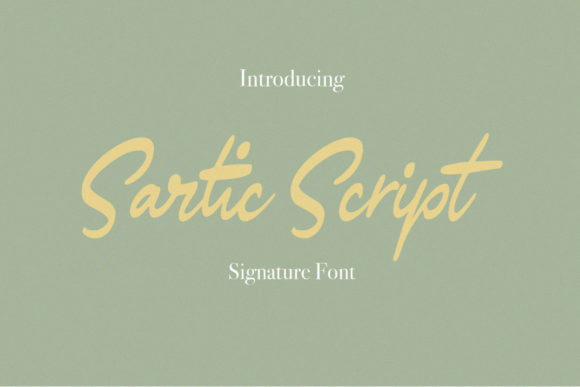
Sartic Script is a classy handwritten font that is perfect for branding, social media headers, product packaging, wedding invites, and more. Its completely hand-drawn nature ensures that every curve and stroke carries an organic rhythm that machine-generated scripts simply cannot mimic. However, even the most beautiful font can fail if used incorrectly. Many users overlook critical details when integrating Sartic Script into their workflows, leading to designs that look amateurish rather than sophisticated.
The Hidden Pitfalls of Choosing a Script Font
One of the most common mistakes beginners make is assuming that any "handwritten" style will automatically add value to their work. There is a significant difference between a font that looks like a quick note scribbled on a napkin and one that mimics professional calligraphy. Sartic Script falls firmly into the latter category, but only if you understand its specific character set.
A frequent error involves ignoring the ligatures. These are the special characters that connect letters together to create a seamless flow, much like how a pen moves across paper without lifting. If you select a version of the font without these ligatures enabled, or if your design software does not support them, the script will appear disjointed. Letters might sit too far apart or collide awkwardly, destroying the illusion of natural handwriting. This oversight can make a high-end wedding invitation look like a typo-ridden text message, severely damaging the perceived quality of your brand.
Another overlooked detail is the weight and contrast of the strokes. Because Sartic Script is designed to be elegant, it relies on varying line thickness to create visual interest. Using this font at very small sizes without adjusting the tracking (letter spacing) can cause the delicate strokes to blur together. When this happens, the text becomes unreadable, forcing your audience to squint or ignore the message entirely. This directly impacts communication efficiency and user experience.
Why Ligatures Matter More Than You Think
To truly leverage the power of Sartic Script, you must ensure that your workflow supports advanced typographic features. Ligatures are not just decorative; they are functional. They prevent collisions between descending letters like 'g' or 'y' and ascending letters like 'l' or 'b'. Without them, the script loses its rhythmic integrity.
If you are using basic word processors or older design tools, you might find that the automatic ligature feature is disabled by default. In these cases, you have two options: upgrade to software that supports OpenType features natively, or manually adjust the kerning pairs. While manual adjustment offers control, it is time-consuming and prone to human error. A better approach is to invest in a design environment that handles these subtleties automatically, ensuring that your Sartic Script always flows naturally.
Application Mistakes That Undermine Professionalism
Even with the correct file settings, the context in which you use Sartic Script determines its success. A classic mistake is overusing the font. Because it is so expressive, it demands attention. Using it for body copy, long paragraphs, or dense blocks of information is a recipe for reader fatigue. The eye struggles to track the varying heights and angles of script letters over extended periods, leading to a poor reading experience.
Instead, reserve Sartic Script for high-impact elements. Use it for:
- Headlines and Titles: To immediately establish a tone of elegance and personality.
- Social Media Headers: Where visual impact is paramount and text volume is low.
- Product Packaging: To convey a sense of artisanal quality and care.
- Wedding Invites: Where the emotional resonance of handwriting is essential.
For all other content, pair Sartic Script with a clean, neutral sans-serif or a simple serif. This contrast creates a balanced hierarchy that guides the reader's eye effectively. When you mix styles without purpose, the design becomes chaotic, and the brand message gets lost in the noise.
The Cost of Poor Legibility
There is also a subtle cost associated with choosing a script that is too ornate for its intended purpose. If your customers cannot read your price list, your contact information, or your call-to-action button because the font is too stylized, you lose potential sales. This is a critical failure point for marketers and small business owners. A pretty font that doesn't communicate clearly is worse than a boring font that works perfectly.
To avoid this, always test your designs at actual display sizes. What looks stunning on a large monitor might become illegible on a mobile screen or a printed business card. Check the contrast against your background color as well. Light script on white backgrounds often lacks sufficient definition, while dark script on busy images can disappear. Always prioritize readability over aesthetics when the text serves a functional purpose.
Evaluating Sartic Script Before You Commit
Before purchasing or downloading Sartic Script for a commercial project, take a moment to evaluate its versatility. Does it include a full range of weights? Are there alternate characters that allow for customization? A robust font family should offer flexibility, allowing you to tweak the look slightly to fit different contexts without switching typefaces entirely.
Check the licensing terms carefully. Some script fonts are free for personal use but require a commercial license for client work, blogs, or product packaging. Failing to secure the proper license can lead to legal issues and unexpected costs down the road. It is always safer to assume a font requires a commercial license unless explicitly stated otherwise.
Furthermore, consider the technical compatibility. Ensure the font files are compatible with the software you plan to use. Most modern design tools handle standard OTF and TTF files seamlessly, but some web-based platforms may require specific formats like WOFF2 for optimal performance. Verifying this upfront saves hours of troubleshooting later.
Making the Right Choice for Your Brand
The decision to use Sartic Script should never be impulsive. It is a powerful asset that elevates a brand's identity, but it requires respect and understanding. By avoiding the pitfalls of poor ligature usage, over-application, and neglecting legibility, you ensure that your typography enhances rather than hinders your message.
When you combine the organic beauty of Sartic Script with thoughtful design practices, the result is a cohesive, professional, and emotionally resonant brand presence. Whether you are designing a luxury wedding suite or a modern social media campaign, this font provides the authentic touch that audiences crave. Just remember to let the script shine where it belongs, and support it with clarity and structure elsewhere. This balanced approach is the key to creating designs that stand the test of time and connect deeply with your audience.